The apps on your phone and laptop
⏱ 15 min4 steps
This piece puts the on your computer and your phone, then looks at what you already pay for. Past your Claude plan, almost everything can wait until a project proves it needs it.
By the end you'll have Claude on both, and you'll know what you pay for and what you're willing to spend. If a screen doesn't match, look under "That's not what I see" in that step.
Claude app Claude on your phone or computer, where you chat with it by typing. claude.ai is the same thing in a web browser. All wordsSteps
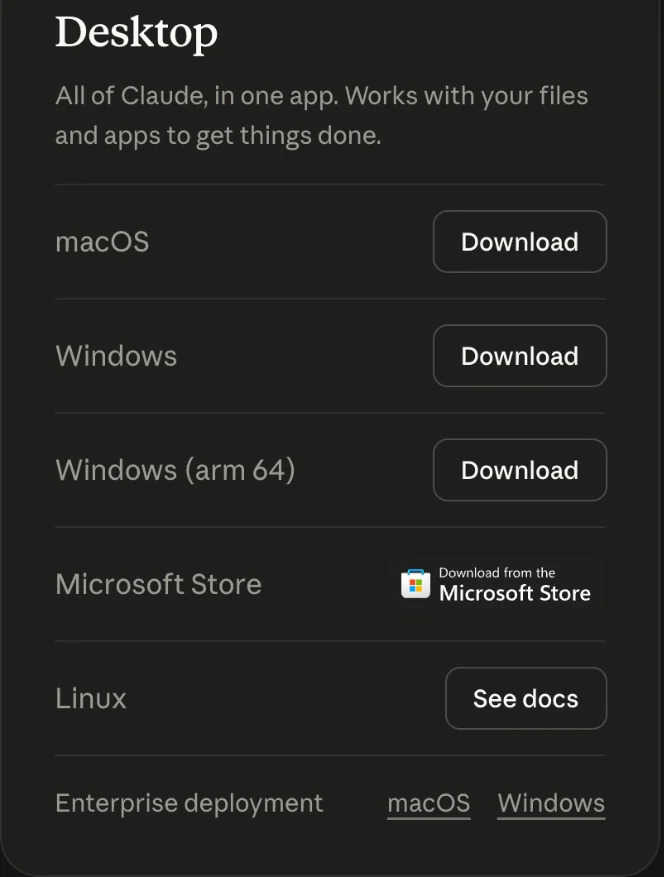
Get the desktop app
- Go to claude.com/download and the app for your computer.
- Open it and sign in with the you pay for.
That's not what I see
- My Mac says the app can't be opened because it came from the internet.
- Make sure you downloaded it from claude.com/download. Then open , click Applications, right-click Claude and choose Open. Your Mac asks once more. Click Open.Finder The Mac app for looking through your files and folders. Its icon is a blue smiling face. All words
Get the phone app
- Get the Claude app on your phone from the App Store or Google Play.
- Sign in with the same account you used on your computer.
Your chats follow you, so you can start an idea on the couch and pick it up at the desk.

That's not what I see
- The phone app wants me to sign in again.
- Sign in with the same account you used on the computer. Your chats show up on both.
Ask Claude what you're paying for twice
Before you add anything, see what you've already got.
- Make a quick list of every tech : what it is, what it costs and when it renews.
- Copy the below. It asks Claude to find what overlaps and what you could drop, without guessing at prices.
I want to check what I pay for in tech every month before I add anything new. Tell me which ones do the same job, which ones I could probably drop, and what I should check before I cancel anything. Ask me questions if anything is unclear. Don't guess at prices you don't know. Here's my list of subscriptions, what each costs, and when each renews:
- Paste it into the Claude app with Cmd+VCtrl+V.
- Press Shift+Enter for a new line, then type or paste your list. Press Enter to send it.
Claude can only see what you show it. I once had Claude check my tech costs from my inbox, and it missed about $458 a month, because those bills went to a different email address. If a bill doesn't come to the inbox you checked, it's not on the list.
subscription Something you pay for every month or every year until you cancel it. All wordsprompt What you type to Claude. A good one says what you want, how to work and what never to do. All wordsYou should see:
Claude answers with your subscriptions sorted out: the ones that do the same job, the ones you could drop, and what to check before you cancel. It may ask you a question or two first.
That's not what I see
- I don't know what I'm paying for.
- Search your email for the words receipt, renewal and subscription. Then look at last month's card statement. That usually finds most of them. Bills that go to a different email address are the ones people miss.
- Claude told me a price that looks wrong.
- It can be out of date. Check the price on the company's own website or on your statement before you decide anything.
Write down your budget and your rules
Pick a number you're willing to spend on tech each month, and write it down where you'll see it. Then add these rules underneath. They're mine:
- One card, one email for every tech subscription, so nothing hides.
- Check once a month what renews. A reminder on your phone's calendar is enough.
- Turn on spending caps and billing alerts on anything that charges by how much you use it.
- Never let Claude buy, subscribe or sign up for anything without you saying yes.
That's not what I see
- I don't know what number to pick.
- Start with what you already pay for Claude, and say nothing else gets added this month without you writing down why. You can change the number any time. The point is deciding on purpose.
What not to pay for yet
You'll see plenty of things offered as you go. Here's what can wait:
- A second subscription. Pick one assistant and learn it well first.
- A name for every idea. Buy it once the idea passes a test, not before.
- Paid . Free tiers cover most small projects.
- Anything billed by usage (people call these keys) until a project needs it. Pro already covers .
- Team plans. Those are for groups of people working together. You're one person for now.
Your challenge
Write down every tech subscription you pay for, what it costs and when it renews. Cancel one you haven't used in a month.
Last checked 2026-10-17
Start here
The apps on your phone and laptop
One-page card · print it or keep it open
What you'll do
This piece puts the Claude app on your computer and your phone, then looks at what you already pay for. Past your Claude plan, almost everything can wait until a project proves it needs it.
The steps
- Get the desktop app
- Get the phone app
- Ask Claude what you're paying for twice
I want to check what I pay for in tech every month before I add anything new. Tell me which ones do the same job, which ones I could probably drop, and what I should check before I cancel anything. Ask me questions if anything is unclear. Don't guess at prices you don't know. Here's my list of subscriptions, what each costs, and when each renews:
- Write down your budget and your rules
If it goes wrong
- My Mac says the app can't be opened because it came from the internet. Make sure you downloaded it from claude.com/download. Then open Finder, click Applications, right-click Claude and choose Open. Your Mac asks once more. Click Open.
- The phone app wants me to sign in again. Sign in with the same account you used on the computer. Your chats show up on both.
- I don't know what I'm paying for. Search your email for the words receipt, renewal and subscription. Then look at last month's card statement. That usually finds most of them. Bills that go to a different email address are the ones people miss.
- I don't know what number to pick. Start with what you already pay for Claude, and say nothing else gets added this month without you writing down why. You can change the number any time. The point is deciding on purpose.
Words
- subscription: Something you pay for every month or every year until you cancel it.
- free tier: The no-cost version of a service, with limits. Fine for most small projects at the start.